
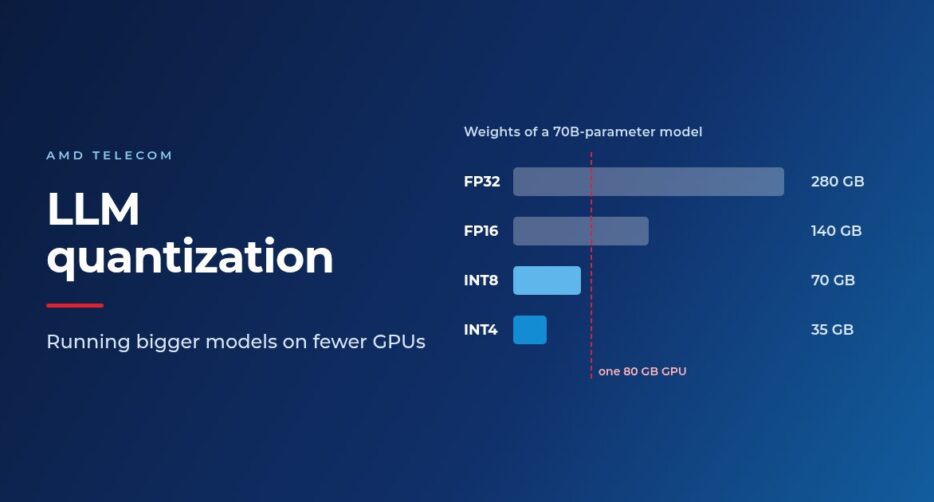
The memory a language model needs follows one simple rule: number of parameters × bytes per value. A 70-billion-parameter model stored in 32-bit floating point needs 280 GB just for its weights. In 16-bit it needs 140 GB, in 8-bit 70 GB, and in 4-bit 35 GB, which fits on a single 80 GB GPU with room to spare. How many bytes each number gets is a choice, and that choice is what quantization is about.
Smaller is also faster
It is natural to assume that generating text is limited by compute. For one conversation at a time, it is not: producing each token means reading every weight from GPU memory once, and the GPU’s arithmetic units spend most of their time waiting for data. Memory bandwidth is the real bottleneck, so fewer bytes per weight translate almost directly into more tokens per second on the same chip.
How quantization works
Quantization maps continuous values onto a fixed grid. An 8-bit integer has 256 levels, and a 4-bit one only 16. A scale sets how much real value each step represents, and a zero point makes sure zero is exactly representable. Each weight snaps to the nearest grid point; the gap is the quantization error. At 8 bits the grid is fine and errors are tiny; at 4 bits they become large enough that simple rounding is no longer good enough.
Granularity matters as much as bit width. One scale for a whole matrix is dominated by a few outlier values and wastes most of the grid on everyone else. Giving each row its own scale is better; giving each small group of weights (typically 128) its own scale is better still, at a small storage cost. Per-group scaling is the standard for 4-bit models.
The number formats differ too. BF16 keeps the wide range of 32-bit floats with less precision, which is why it is preferred for training, where gradients can spike. FP16 has more precision but overflows above 65,504. FP8 is becoming a training format in its own right. NF4 is a 4-bit lookup table whose 16 values follow a normal distribution, matching the shape of real weight distributions.
The main methods
Almost everything deployed today uses post-training quantization: take a trained model and a small calibration set of a few hundred samples, and quantize in minutes to hours instead of retraining for days. The best-known methods:
- GPTQ quantizes a layer one column at a time and adjusts the remaining weights to compensate for each rounding error, using second-order information about which weights the output is most sensitive to. The GPTQ paper (Frantar et al., 2022) showed 4-bit models staying close to their 16-bit accuracy where plain rounding degrades sharply, and quantized a 175-billion-parameter model in about four GPU hours.
- AWQ (activation-aware weight quantization) observes that about 1% of weight channels matter far more than the rest, judged by how strongly they are used, not by how large they are. It scales those channels up before quantizing so that they lose less precision. It won best paper at MLSys 2024.
- SmoothQuant targets 8-bit weights and 8-bit activations. It moves the difficulty of rare activation outliers into the weights, so that both can run on 8-bit hardware for high-throughput serving.
- GGUF, the format behind llama.cpp, runs quantized models on CPUs and consumer hardware. Its “K-quants” such as Q4_K_M give sensitive layers more bits and average a little under five bits per weight, so a 7B model shrinks from about 13.5 GB in 16-bit to around 4 GB. Q4_K_M is widely used as the default balance of size and quality.
Fine-tuning on limited GPUs: QLoRA
Quantization is not only for inference. QLoRA freezes the base model in 4-bit NF4 and trains only small low-rank adapter matrices kept in 16-bit, so gradients flow through a tiny fraction of the parameters. A second trick, double quantization, compresses the scale factors themselves. The result, as the QLoRA paper (Dettmers et al., 2023) showed, is that a 65B model can be fine-tuned on a single 48 GB GPU, which put large-model fine-tuning within reach of teams without data-centre budgets.
Don’t forget the KV cache
At long context lengths the KV cache, the stored keys and values of the conversation so far, can outgrow the weights. For a model like Llama 2 70B it is about 320 KB per token in 16-bit, or roughly 40 GB at 128,000 tokens. Storing the cache in 8 bits halves that memory and 4 bits quarters it. Serving engines such as vLLM support an 8-bit (FP8) cache; the quality cost is usually small but should be measured on your own tasks. Our article on serving LLMs on your own GPUs covers the cache in more detail.
How low can you go?
Larger models tolerate compression better, because their redundancy absorbs the rounding noise. Research on the trade-off between bits and accuracy (Dettmers and Zettlemoyer, “The case for 4-bit precision”, 2023) found 4-bit to be almost always the best choice for a fixed memory budget: a larger model at 4 bits beats a smaller model at higher precision. Below about 3 bits, standard methods break down. Research methods such as QuIP#, AQLM and QTIP use vector quantization to make 2-bit usable, and Microsoft’s BitNet b1.58 goes to three values per weight, but it has to be trained that way from scratch.
A practical map
- One user or a few, memory-bound: 4-bit weights with 16-bit activations (GPTQ or AWQ).
- High-throughput serving: 8-bit weights and activations, or FP8 on hardware that supports it.
- CPUs, laptops and edge devices: GGUF, starting from Q4_K_M.
- Fine-tuning on your own data with limited GPUs: QLoRA.
What this means when the GPUs are your own
At AMD Telecom we train models on our own in-house GPUs. On fixed hardware, quantization decides which model sizes fit, how many can run side by side and how many tokens per second each one delivers. It also makes adapting larger models to your own data practical. One caution applies everywhere: perplexity is only a proxy. Always evaluate the quantized model on your own tasks, such as your documents, your languages and your output formats, before it goes into production.
If you want a model trained or adapted on your own data, see our AI Model Training and AI Model Development services, or talk to our experts.